




Online Payment FAQs
Want to learn more about paying online with Alliance Association Bank? » Click here to download the user guide...
(click on a question to display an answer or suggestion)
Where do I find the Management ID, Association ID and Homeowner ID or Account ID values to make an online payment?
The information needed to make an online payment can be located on the scanline of your payment coupon.
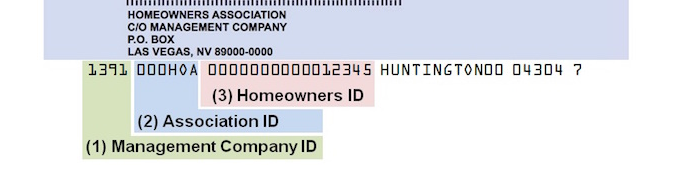
- First 4 digits or numbers: the Management Company ID
- Next 6 digits or numbers: the Association ID
- The remaining 16 digits or numbers: your Homeowners account ID
I have already set up and used an online account with Alliance Association Bank to submit payment or set up reoccurring payments and now it will not let me log in. What do I do?
Contact Alliance Association Bank’s HOA department directly at 1-888-734-4567 or via email at
If you have a technical issue making an online payment on Alliance Association Bank's payment portal, you can contact Alliance Association Bank at (844) 739-2331.
Are there any fees associated with making online payments?
Making a one-time payment with your checking account information (e-check) is $1.95 per transaction. Any credit card payment has a bank fee of 3%, while debit cards incur a flat fee of $5.00. For additional details on the debit/credit card transaction fee, please contact Alliance Association Bank’s HOA department at 1-888-734-4567 or via email at
What is the link to make a payment directly with my association's bank?
To make a payment with your association's bank, visit the following link: https://onlinepay.allianceassociationbank.com/home.aspx?cmc=e74b955e-2a54-4c63-a90a-05fcebda4be7